Generators/UPS
What Size Emergency Generator Do I Need?
You need an emergency generator sized to your total wattage needs. Smaller units, ranging from 5 to 7 kW, cover essentials such as lights, refrigerators, and sump pumps, while units with 20–22 kW provide reliable whole-home backup, including HVAC systems.
What Size Emergency Generator Do I Need?
Refers to the process of calculating backup power capacity to match the energy demands of a household or business during outages.
✅ Determines generator size based on watts, circuits, and load
✅ Ensures appliances, HVAC, and lighting operate safely
✅ Prevents underpowered or oversized generator selection
Emergency Generator Standby Power Training
Power Quality Analysis Training
Request a Free Emergency Generator Training Quotation
The first step in choosing a generator is calculating your total wattage requirements. Appliances and devices draw two types of power: running wattage, which keeps the equipment operating, and starting wattage, sometimes referred to as surge watts, which is required during startup. Motors, pumps, and compressors often demand two to three times their running watts to start. Identifying the highest starting load is critical to prevent overloading your generator. When considering emergency backup generator options, it is important to compare capacity, fuel type, and wattage requirements to ensure your unit can handle both essential and whole-home loads.
Running watts cover steady-state demand, while starting watts account for those momentary peaks. For example, a refrigerator might require 700 running watts but 2,200 starting watts. If you plan to run multiple appliances simultaneously, your generator must be sized to meet the total running watts plus the highest single starting wattage. Understanding the emergency power supply options available helps homeowners decide whether a portable, inverter, or standby generator best matches their outage risks.
Essential vs Whole-Home Backup
Many homeowners must choose between powering only essential appliances and covering the entire house. Essential circuits usually include lighting, refrigerators, sump pumps, medical devices, and communication equipment. A portable generator rated between 5,000 and 7,500 watts usually provides adequate backup power for these needs. For homes and facilities with sensitive electronics, pairing a generator with a battery backup system can extend runtime and protect against short interruptions.
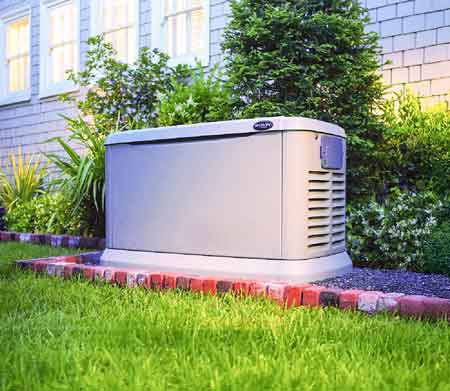
For those seeking seamless operation during power outages, a home standby generator is often the most suitable solution. Whole-home units are permanently installed, connected through an automatic transfer switch, and can power air conditioners, electric stoves, and central heating systems. House generators in the 18- to 22-kW range are commonly used for whole-home backup, ensuring that air conditioning units and HVAC systems remain operational. Learning how does a generator work provides useful insight into why surge watts and starting loads play such an important role in choosing the right size.

Types of Emergency Generators
Different types of generators are available for both residential and commercial applications. Portable generators are mobile and fueled by gasoline or propane, offering versatility during short-term outages. Inverter generators deliver cleaner power for sensitive electronics, operate quietly, and can be paralleled for more capacity. Home standby generators are fixed installations that run on natural gas or propane, providing automatic protection without manual intervention.
When choosing a generator, consider whether you need portability, quiet operation, or a permanent, automated solution. Powerful generators may be ideal for critical facilities, while inverter generators are suitable for households prioritizing fuel efficiency and reduced noise. Exploring the electrical generators and UPS channel gives a broader view of technologies, ratings, and selection tips that can guide your generator sizing decision.
Fuel Considerations
Fuel type influences convenience, runtime, and maintenance. Portable units typically run on gasoline, though dual-fuel models also accept propane. Home standby generators commonly use natural gas supplied by a utility line or propane stored on-site. Natural gas provides an uninterrupted fuel supply and eliminates storage issues, but requires a sufficient supply line. Propane offers longer storage life and flexibility.
Air Conditioning and High-Demand Loads
Air conditioning units are often the deciding factor when choosing the right size generator. Central systems have compressors that require very high starting wattage. A 3-ton air conditioner can easily exceed 6,000 surge watts at startup. If cooling is optional, smaller window units may lower demand and allow downsizing. Carefully assessing the highest starting load ensures the generator can handle surge watts without stalling.
Choosing the Right Size Generator
To size a unit accurately, follow this process:
-
List all appliances you want powered during outages.
-
Record their running wattage.
-
Identify the appliance with the highest starting wattage.
-
Add total running watts plus the single highest starting wattage.
-
Select a generator that exceeds this figure, leaving a 20 percent safety margin.
This approach avoids undersizing, which risks tripping breakers, and oversizing, which increases cost and reduces efficiency. For critical applications such as data centers, designing data center UPS infrastructure demonstrates how generators and UPS systems work together to deliver reliable power continuity.
Emergency Generator Sizing Checklist
| Step | Action | Explanation |
|---|---|---|
| 1 | Identify all appliances and systems you want powered during an outage. | Start with essentials such as lights, refrigerator, sump pump, Wi-Fi, and medical devices. |
| 2 | Write down the running wattage for each device. | Check the appliance label or manual for the continuous power required. |
| 3 | Find the starting wattage of appliances with motors or compressors. | Items like an air conditioning unit, refrigerator, or pump need extra surge watts to start. |
| 4 | Add total running watts to the highest single starting wattage. | This combined total represents your minimum generator requirement. |
| 5 | Compare this number to generator ratings in running watts and surge watts. | Ensure the unit’s running capacity and surge rating both meet or exceed your needs. |
| 6 | Decide between essential-only coverage or whole-home backup power. | Smaller portable units cover essentials; home standby generators cover entire houses. |
| 7 | Consider fuel type: gasoline, propane, or natural gas. | Each has pros and cons for cost, storage, runtime, and convenience. |
| 8 | Choose from types of generators: portable, inverter, or standby. | Portable for flexibility, inverter for quiet, clean power, and standby for automatic operation. |
| 9 | Allow a safety margin of 20 percent above your calculated wattage needs. | Prevents overloads and ensures smoother operation during peak demand. |
| 10 | Plan for the installation, safe placement, and maintenance of the transfer switch. | A transfer switch prevents backfeeding; maintenance ensures long-term reliability. |
Practical Scenarios
An essential-only setup might include lights, a refrigerator, a sump pump, and a small air conditioning unit. Combined running wattage may reach 3,500 watts, with starting surges pushing requirements to 6,000 watts. In this case, portable generators or paired inverter generators can suffice.
A whole-home backup scenario, including a central air conditioner, electric water heater, and cooking appliances, could demand 18–22 kW. Here, a home standby generator fueled by natural gas is the most suitable option.
Maintenance and Reliability
Even the most powerful generators require maintenance. Portable models need regular oil changes, fuel stabilization, and safe storage. Home standby systems should be exercised monthly and serviced annually. Ensuring transfer switches are tested and circuits are balanced guarantees reliable performance when power outages strike.
The question of what size emergency generator I need is answered by calculating wattage requirements, balancing running watts with surge watts, and factoring in the highest starting load. Smaller portable units provide backup power for essential appliances, while whole-home standby systems fueled by natural gas or propane ensure uninterrupted comfort, including the operation of air conditioners and HVAC systems. By carefully selecting a generator, considering the fuel type, and planning for regular maintenance, you can achieve reliable protection against outages while avoiding the pitfalls of underpowered or oversized equipment.
Frequently Asked Questions
How do I size a generator for an air conditioner?
To size a generator for just your air conditioning unit, check the unit’s starting watts and running watts on the nameplate. Add at least 20 percent for surge protection. A central air conditioner usually requires a larger home standby generator, while a window unit may be supported by a portable or inverter generator.
What are surge, peak, and starting watts?
Surge watts, peak watts, and starting watts all describe the brief power spike needed when a motor-driven appliance starts. They are higher than running watts and critical for choosing the right size generator. If ignored, the generator can stall or overload.
Can a portable generator power my whole home?
A portable generator can power an entire home only if it has sufficient capacity and is connected to the home's electrical system through a transfer switch. Without this, backfeeding into utility lines is dangerous. For whole-home backup, most homeowners rely on a permanently installed standby generator.
Is natural gas better than propane for standby units?
Natural gas is convenient because it provides an unlimited supply and eliminates the need for storage, but it relies on an active utility line. Propane is stored on-site, lasts longer in storage, and offers flexibility during utility disruptions. The best choice depends on availability and risk of outages.
Related Articles
Download Our FREE Generators/UPS Handbook
Power Quality, Grounding & UPS Handbook Vol. 9
As modern equipment becomes more sensitive to even the slightest fluctuation in power, grounding and power quality are crucial components to the smooth running of any business.
In this volume, we explore the most current advancements in power quality monitoring, mitigation techniques, and troubleshooting, providing expert insights into managing power disturbances, harmonics, and voltage fluctuations. The handbook delves into best practices for grounding systems, emphasizing safety, regulatory compliance, and the prevention of electrical faults. Moreover, we offer a detailed analysis of the latest UPS technologies, including their integration, configuration, and maintenance to ensure optimal performance during power outages and fluctuations.
With a focus on practical applications and emerging trends, Power Quality, Grounding & UPS Handbook, Volume 9 serves as an invaluable resource for engineers, facility managers, and electrical professionals. Whether you are working in industrial, commercial, or critical infrastructure settings, this handbook will provide you with the tools and knowledge necessary to safeguard your power systems, maintain operational continuity, and enhance system reliability in an increasingly power-dependent world.
Latest Generators/UPS Articles
Battery Backup Explained
Battery backup delivers uninterruptible power to critical loads using UPS topology, inverter systems, and energy storage, providing voltage regulation, surge protection, and runtime during outages for sensitive equipment and industrial control circuits.
The Complete Guide to Battery Backup
Battery backup is crucial in providing uninterrupted power for our devices and equipment during power outages. By understanding the different types of backup systems, battery capacity, and maintenance, you can make a well-informed decision to protect your home or business from unexpected power interruptions. So embrace the benefits of modern battery backup solutions and never be left in the dark again. For critical facilities, understanding how an emergency power supply integrates with battery backup can inform resilience planning.
We often take the constant supply of electricity for granted. However, power outages are unavoidable and can leave us scrambling for alternative energy sources. This is where battery backup solutions come into play, providing an essential lifeline in times of need. Many organizations adopt an uninterruptible power supply to ensure seamless continuity during brief outages.
Battery backup systems, or Uninterruptible Power Supply (UPS) systems, provide emergency power when the primary electrical supply fails. These systems can range from small portable power banks to larger installations that support businesses during power outages. A well-designed battery backup ensures that your essential devices and equipment stay up and running, minimizing downtime and preventing data loss. If you're new to the technology, this overview of what a UPS system is clarifies core components and typical use cases.
To choose the right UPS for your needs, consider factors such as the power requirements of your devices, the desired backup time, and your budget. An essential distinction to understand when selecting a backup solution is the difference between a UPS and a standard battery backup system. While both provide emergency power, a UPS offers a seamless transition without interruption to the connected devices. This feature is especially crucial for sensitive equipment like computers and servers. For a structured checklist, consult these tips for selecting a UPS system before finalizing your purchase.
Battery backup capacity plays a significant role in determining the duration of backup time during a power outage. Capacity is measured in ampere-hours (Ah) or watt-hours (Wh), which defines how much energy a battery can store. The larger the capacity, the longer it will last during a power outage. However, remember that larger-capacity batteries may require more space and come at a higher cost. To estimate runtime, review guidance on how long battery backups last under varying loads and conditions.
One of the most popular types of rechargeable batteries used in backup systems is the lithium-ion battery. These batteries boast a high energy density, allowing them to store more power in a smaller form factor. They also have a longer lifespan than traditional lead-acid batteries, making them an ideal choice for backup systems. Compatibility between lithium-ion modules and your UPS power supply should be verified for charging profiles and safety features.
Maintaining and prolonging the life of your battery backup involves a few essential steps. Please make sure that you store the batteries in a cool, dry place, away from direct sunlight and extreme temperatures. Regularly check the battery connections for any signs of corrosion and clean them if needed. Replacing your batteries according to the manufacturer's guidelines is crucial, as their efficiency decreases over time.
Solar power systems are increasingly integrated with battery backups as renewable energy sources become more prevalent. A solar battery backup stores energy generated by solar panels during the day, allowing you to tap into that stored power during a power outage or when energy demand is high. You can create a sustainable and eco-friendly power management system by combining solar power and battery storage. In hybrid systems, choosing an appropriate UPS uninterruptible power supply topology helps balance efficiency, transfer time, and protection.
Now that you understand battery backup solutions better, you can make an informed decision when selecting a system to safeguard your essential devices and equipment during power outages. You can ensure continuous power supply and minimize downtime by considering factors like UPS versus standard backup procedures, battery capacity, and type, and integrating solar power when possible.
Related Articles
Understanding Your UPS Power Supply - Uninterruptible Electricity
UPS power supply ensures uninterruptible power, voltage regulation, and surge protection with battery backup, inverter, and AVR, delivering clean sine-wave output for servers, networking gear, and industrial controls during outages and brownouts.
UPS Power Supply Fundamentals
WHAT IS A UPS POWER SUPPLY?
An Uninterruptible Power Supply (UPS) System is a device that supplies battery backup power to computers and peripherals during short power outages, and allows systems to safely shutdown during prolonged blackouts. UPS systems also correct brownouts and overvoltages, stop damaging power surges and filter disruptive line noise. An Uninterruptible Power Supply system sits between a power supply (e.g. a wall outlet) and a device (e.g. a computer) to prevent undesired features of the power source (outages, sags, surges, bad harmonics, etc.) from the supply from adversely affecting the performance of the device. For a deeper primer, consult what a UPS system entails to see how architectures differ.
WHAT CAUSES POWER PROBLEMS?
Despite advances in technology, power grids across the country are struggling to supply reliable power to homes and businesses. The increasing occurrence of large natural disasters such as Hurricane Katrina, along with the growing demand for electricity, have put a significant strain on power grids and an increase in damaging power problems. If your home office or business has ever been disrupted by a power problem, it’s not surprising. IBM estimates that 120 power problems hit the typical computer in a month—that works out to four per day! As a result, computer systems and electronics are under siege by more frequent blackouts, brownouts, overvoltages, surges and other power anomalies. Thanks to the aging of the nation’s power-producing infrastructure, these power problems are likely to become more and more common in the coming years. Local sources can also generate blackouts, brownouts, overvoltages and surges. For example, if your neighbor starts up an electrical motor or the office on the floor below you blows a fuse, a blackout, brownout, overvoltage or surge could result. Line noise is typically generated by turning on other power-drawing devices connected to the same electrical system. Turning on florescent lights, laser printers or appliances, working near a radio station, using a power generator or simply working during a lightning storm can all introduce line noise into connected equipment. Ever notice the “snow” on your TV when you use a blender or a hair dryer? That’s line noise being sent back into your electrical system and into your TV. To understand how these disturbances are measured and mitigated, review UPS fundamentals for context on sizing and topology.
Visit Our UPS System Training Page
WHAT ARE THE EFFECTS OF POWER PROBLEMS?
Blackouts, brownouts, power surges and line noise can result in computer system downtime or lockups, data loss, lost productivity, audio static, video snow, slow electronic degradation and ultimately catastrophic equipment damage. Additionally, organizations should be aware of UPS risks so mitigation plans cover maintenance, ventilation, and load management.
HOW DOES A UPS POWER SUPPLY WORK TO PROTECT AGAINST POWER PROBLEMS?
An Uninterruptible Power Supply System provides comprehensive protection against all power problems. To further understand how UPS Systems protect against power problems, consider the different types of UPS: A concise overview of modes and components is outlined in this Uninterruptible Power Supply reference for quick comparison.
STANDBY UPS POWER SUPPLY
Power is fed through surge and noise suppression circuitry and on to your equipment. Meanwhile, a battery charger keeps an internal battery topped off and ready for use. During a blackout, brownout or overvoltage, an inverter converts battery power into a simulated sine wave output. When power returns, the Uninterruptible Power Supply switches back to AC power and the battery is recharged. Sensing of a low-voltage situation and switching to battery power happens so quickly that your equipment continues to operate flawlessly.
LINE-INTERACTIVE UPS POWER SUPPLY
Power is fed through surge and noise suppression circuitry. Then built-in line conditioning circuitry regulates high or low voltages back to normal levels, and sends clean power on to your equipment, without using battery power. Meanwhile, a battery charger keeps an internal battery topped off and ready for use. During a blackout, an inverter switches on and converts battery power into a simulated sine wave output. When power returns, the inverter switches off and the battery is recharged. Because all switching happens within a few milliseconds, your equipment is unaffected.
ON-LINE UPS SYSTEMS
This is the highest level of battery backup protection available. Power is first broken down and then perfectly reconstructed by the inverter, which is “on-line” 100% of the time. There is absolutely no transfer switching time. This process completely eliminates incoming surge and line noise, adjusts high or low voltages, and produces perfect sine wave power. When energy costs matter, explore high-efficiency UPS strategies that reduce heat and operating expense.
IMPORTANT UPS POWER SUPPLY FEATURES
There are a number of other factors important to UPS users beyond its standby, line-interactive or on-line design. Auto shutdown, battery runtime, number of outlets and phone line suppression could be critical factors in choosing a system for a particular application. When evaluating these attributes, consult tips for selecting a UPS to match load, runtime, and management needs.
UNATTENDED SHUTDOWN RELATED FEATURES:
Monitoring Ports (Standard vs. Smart Monitoring) — Many Uninterruptible Power Supply supplies can “talk” to a connected device and instruct it to shut down when power fails. Models with a monitoring port have this ability. Tripp Lite offers UPS products with two types of monitoring ports, Standard and Smart. Standard Port (USB or DB9) — Able to send basic signals regarding “ON BATTERY”, “LOW BATTERY” and “POWER RESTORED” conditions. Smart “Enhanced” Monitoring Port (USB or DB9) — Same as standard interface with additional data regarding voltage, temperature, load level, and more can be transmitted to the connected computer. Many of the larger Smart products also have multiple monitoring ports so that a few connected computers or servers can be automatically shut down in the event of a power failure. This feature is especially valuable in data centers, computer rooms, and in cases where a single UPS will support several servers or workstations. Free Monitoring Software — Many of the models that include a monitoring port also support free PowerAlert UPS monitoring and shutdown software via download. It interprets the signals coming from the DB9 monitoring port and instructs the UPS to take the appropriate action. When the Uninterruptible Power Supply transmits a “power failure” message, the UPS waits a pre-configured period of time. If power isn’t restored by the end of the “wait” time, PowerAlert saves all data and shuts down the connected computer or server so that no data is lost.
RUNTIME RELATED FEATURES:
Expandable Battery Runtime — Most Uninterruptible Power Supply systems for computer use are sized to run for about 5-10 minutes at full load. Certain applications, such as telephone and critical networking systems, often require much longer battery runtimes (from 30 minutes to over 8 hours). Fax Modem/Surge-Only Outlets — Most home and home office PCs are equipped with a modem and several peripherals. Generally UPS protection is required for a computer and monitor only and all remaining items, like printers, scanners and other accessories, are connected to a separate surge suppression strip. Modem lines connecting to computers should also be protected with a data line surge suppressor. For planning purposes, see how long battery backups typically last across common sizes and conditions.
TYPICAL UPS POWER SUPPLY APPLICATIONS
UPS power supplies are designed to protect computers and all electronics from damaging blackouts, brownouts, over voltages, surges and line noise.
Related Articles
High-Efficiency UPS Systems
High Efficiency UPS Systems deliver double-conversion protection, low THD, high power factor, intelligent battery management for data centers, ensuring clean power, reduced losses, redundancy, advanced SNMP monitoring, and remote alerts.
How High-Efficiency UPS Systems Work
Energy efficiency for uninterruptible power supply (UPS) equipment is so important because they can influence UPS energy efficiency and can directly impact energy costs. This paper will compare the differences in energy efficiencies among various UPS topologies available today through laboratory testing. These studies demonstrate flywheel—based UPS technology achieves much higher efficiency ratings as compared to legacy battery based UPS systems, resulting in substantial cost savings over the life of the system. For context, understanding the basics of a UPS is essential, and resources like what is a UPS system explain core functions in more detail.
UPS systems provide power conditioning and backup power to mission critical facilities such as data centers, broadcast sites and hospitals. UPS systems protect these sites from voltage fluctuations such as surges and sags or frequency fluctuations and also provide ride-through or temporary power to bridge the gap between a power outage and the restoration of utility power or the transfer to a backup generator. The UPS uses a form of short-term (seconds to minutes) energy storage to assist in power conditioning and power bridging in the event of a complete outage. The most common and practical direct-current (DC) energy storage forms are chemical batteries (for example, lead acid, NiCd, and NiMH), flywheels and ultra-capacitors. To perform its two functions, a UPS requires energy—in this case electricity. For an overview of architectures and operating modes, see UPS uninterruptible power supply overview for context on how these elements interact.
The industry measures UPS efficiency as power out divided by power in with the UPS consuming a portion of the input power. The amount of energy consumed by the UPS represents energy lost or inefficiency. UPS inefficiency can waste 10 per cent or more of utility input within the UPS itself and is a significant concern for data center operators, utilities and policy makers. UPS inefficiency amounts to thousands of kilowatt hours per year wasted in the process of protecting even a medium-sized mission critical load. A deeper understanding of conversion stages and losses can be found in UPS power supply fundamentals that map components to typical efficiency impacts.
UPS EFFICIENCY DEFINED
The efficiency of a UPS, as defined by the International Electrotechnical Committee, is “the ratio of (active) output power to (active) input power under defined operating conditions,” where defined operating conditions refer to a specific per cent load and load type (linear/resistive versus non-linear). Active power is measured in watts or kilowatts. Manufacturers often publish UPS ratings and efficiency curves that help compare performance across load levels.
IMPORTANCE OF UPS EFFICIENCY
The power demands of data centers are significant and growing. The U.S. Environmental Protection Agency (EPA) estimated data centers consumed 61 billion kilowatt-hours (kWh) in 2006 at a total electricity cost of approximately $4.5 billion. The EPA’s baseline forecast predicts a near doubling of energy consumption by 2011 to more than 100 billion kWh and $7.4 billion, assuming current growth and efficiency trends (2). In its alternative forecast views, EPA identified adoption of higher efficiency UPS systems as a key factor in reducing data center power consumption (3). A study by Intel Corp. showed typical UPS systems as contributing six to seven per cent losses to overall data center energy use. Strategic placement, redundancy choices, and distribution design are covered in designing data center UPS infrastructure to align efficiency goals with reliability.
At the individual data center level, improving UPS system efficiency offers direct, 24-hour-a-day energy savings, both within the UPS itself and indirectly through lower heat loads and even reduced building transformer losses. When a full data center equipment load is served through a UPS system, even a small improvement in system efficiency can yield large annual cost savings. Pacific Gas & Electric (PG&E) estimates a 15,000 square-foot data center with IT equipment operating at 50 watt-per-square-foot requires 6.9 MWh (megawatt hour) of energy annually for the information-technology (IT) equipment. If the UPS system supplying that power has its efficiency improved by just five percentage points, the annual energy bill will be reduced by 384,000 kWh, or about $38,000 at $0.10 per kilowatt hour (kWh), plus significant additional savings from the reduced cooling load. Procurement teams can apply tips for selecting a UPS system to balance efficiency ratings with lifecycle service considerations.
COOLING REQUIREMENTS AS A FUNCTION OF EFFICIENCY
When evaluating a UPS and its efficiency, it is important to keep in mind the first law of thermodynamics that “energy can neither be created nor destroyed.” With respect to UPS systems, the difference in active input and output power represents heat loss as a result of the activity the UPS performs. Heat interferes with the environmental conditions in a defined space such as an electrical room and will ultimately drive the temperature up and potentially cause short- or long-term damage to equipment as it exceeds designed temperature thresholds. A sound design of an electrical room includes an air-conditioning or precision cooling system to maintain a certain temperature band. The lower the efficiency of the UPS, the more heat that is generated and the more cooling that is required in the room, driving up capital costs and the ongoing operational expenses of the cooling system. As a general rule of thumb for an efficient centralized cooling plant, it takes 0.33 kW of power to cool one kilowatt of heat. As a result, the operational cost of a low efficiency UPS is further exacerbated by the additional cooling cost. Thermal performance features and maintenance guidelines in uninterruptible power supply best practices can further mitigate cooling overheads in dense rooms.
FACTORS IMPACTING UPS EFFICIENCY
There are two key factors influencing UPS system efficiency: the topology of the UPS system itself and the design of the data center’s power supply and distribution, which determines the load factor of the UPS.
UPS TOPOLOGY
The design of the UPS system itself has a significant impact on efficiency. Put simply, some UPS designs are inherently more efficient than others. There are two major topologies in use today in mission critical facilities—parallel online (also known as line interactive) and double conversion.
From: Power Quality, Grounding & UPS Handbook, Vol 12, The Electricity Forum
Related Articles
Emergency Backup Generator
Emergency backup generator ensures standby power during outages, with automatic transfer switches, diesel or natural gas fuel, load management, and kW sizing to protect critical systems, homes, and businesses with reliable resilience.
Understanding How an Emergency Backup Generator Works
An emergency backup generator is a device that generates electrical power during an unexpected power outage or interruption in the power supply. Various factors, including natural disasters, severe weather conditions, or equipment malfunctions, can cause power outages. A unit can be a lifesaver in such situations, providing temporary power to essential appliances and keeping the lights on until power is restored. For an overview of emergency power supply concepts, see this introduction to emergency power supply for additional context.
Emergency backup generators come in different sizes and types and are typically powered by gasoline, diesel, natural gas, or liquid propane. Portable generators are typically smaller and can be moved around, while home standby generators are larger and permanently installed outside the home. Portable generators are an excellent choice for powering small appliances, while standby generators are more powerful and can supply power to an entire home.
When choosing a unit, it's important to consider the fuel source and the generator's power output. Generators run on different fuel types, and each type has advantages and disadvantages. Gasoline generators are commonly used due to their affordability and easy availability, but they require frequent refuelling and can be noisy. Diesel generators are more fuel-efficient and can provide longer run times but are typically more expensive. Natural gas and liquid propane generators are clean-burning and can provide uninterrupted power for extended periods, but they may require professional installation and can be expensive.
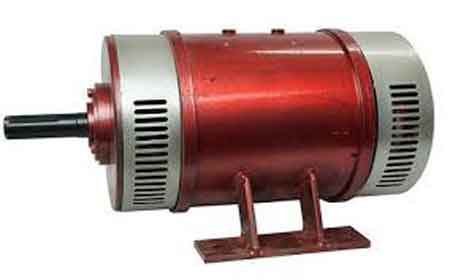
Generators work by converting mechanical energy into electrical energy. The fuel source powers the generator's engine, and the engine's motion is then converted into electricity by a generator alternator. The unit's power output is measured in watts, and the generator's wattage should be sufficient to power the essential appliances and devices during a power outage. However, it's important to note that a generator can power not all appliances and devices, and some may require a larger generator or an electrical panel upgrade.
An emergency generator should always be installed and operated according to the manufacturer's instructions to ensure safety and reliable performance. Portable generators should never be operated indoors, as they emit carbon monoxide and can cause deadly carbon monoxide poisoning. Extension cords should also be used to connect appliances to the unit, as improper use of extension cords can result in electrical shock or fire.
There are two types of home standby generator systems: manual transfer switches and automatic transfer switches. A manual transfer switch requires the homeowner to manually switch the electrical load from the utility power source to the unit. On the other hand, an automatic transfer switch automatically switches the load to the generator when the utility power goes out. An automatic transfer switch is a more convenient and reliable option. It ensures that the generator will start automatically and the essential appliances will be powered without manual intervention. For detailed specifications and selection guidance, review this automatic transfer switch resource to understand compatibility and code requirements.
Emergency backup generators are widely used in industrial, commercial, and institutional applications to provide reliable power during unexpected power outages. Here are some examples of how they are used in these settings:
Industrial Applications:
- Manufacturing plants: They are used to power critical manufacturing equipment during power outages, ensuring that production can continue without interruption.
- Oil and gas facilities: They power essential equipment such as pumps, compressors, and instrumentation during power outages, preventing downtime and maintaining safety.
- Data centers power critical IT infrastructure such as servers and networking equipment, ensuring that data and systems remain operational during power outages.
In many industrial environments, pairing generators with an uninterruptible power supply helps bridge transfer gaps and protect sensitive controls.
Commercial Applications:
- Retail stores: They power essential equipment such as cash registers, refrigerators, and lighting during power outages, ensuring that the store can remain open and customers can shop safely.
- Office buildings: They are used to power critical systems such as elevators, security systems, and lighting during power outages, ensuring that employees can continue to work safely.
- Hotels and resorts: They power essential equipment such as elevators, lighting, and HVAC systems during power outages, ensuring guests remain comfortable and safe.
For retail and office continuity, an UPS power supply can maintain point-of-sale terminals and network gear until generators assume the load.
Institutional Applications:
- Hospitals and healthcare facilities: They power critical medical equipment such as ventilators, monitors, and life support systems during power outages, ensuring patient care is not interrupted.
- Schools and universities: They power essential equipment such as lighting, HVAC systems, and emergency communications during power outages, ensuring that students and staff remain safe and comfortable.
- Government buildings: They power critical systems such as emergency lighting, communications, and HVAC systems during power outages, ensuring that government operations continue uninterrupted.
Institutions that depend on life safety and communications often deploy a UPS system to ensure clean power during transfer events.
They are essential for ensuring critical operations can continue during unexpected power outages in various industrial, commercial, and institutional settings.
How does a generator work?
During an unexpected power outage, a generator produces electrical power from a fuel source. When the power goes out, the unit's engine is powered by gasoline, diesel, natural gas, or liquid propane. The engine's motion is then converted into electricity by a generator alternator via an electric start, which produces electrical power. This power is transferred through a transfer switch to the home's electrical system, powering essential appliances and devices until power is restored. For a step-by-step explanation of this process, consult this guide on how a generator works before planning your installation.
How does a generator work with other technologies?
A generator can be used with other technologies to restore power after a power outage. For example, a solar panel system can generate electricity during the day. A unit can provide power at night or when the solar panels are not generating enough power. A battery backup system can also store excess solar or generator power, providing power during an outage. To size and configure storage correctly, compare options in this battery backup overview for best results.
What are the benefits of having an emergency backup generator?
There are several benefits. The most significant advantage is that it provides reliable power during a power outage, ensuring that essential appliances and devices continue functioning. This can be particularly important for households that rely on medical equipment or have special needs. Knowing that your home and family are protected during an unexpected power outage can also provide peace of mind. Finally, it can add value to your home, as it is a valuable and desirable feature for potential buyers.
What size generator do I need for emergency backup power?
The size of the generator needed for emergency backup power depends on the power requirements of the appliances and devices that need to be powered during a power outage. Therefore, it's important to calculate the wattage requirements of the essential appliances and devices during a power outage and choose a unit with a power output that is sufficient to power them. A licensed electrician or generator installer can help you determine the appropriate generator size based on your specific power requirements.
How long will it run?
The run time depends on several factors, including the fuel source, generator size, and load demand. Depending on the fuel source and generator size, portable power generators can run on a single fuel tank for several hours to several days. Therefore, choosing a unit with sufficient fuel capacity and monitoring its fuel level during a power outage is important. Then, if additional run time is needed, other dual fuel can be added to the unit.
Can I use one indoors?
Portable generators should never be used indoors, as they emit carbon monoxide and can cause deadly carbon monoxide poisoning. On the other hand, home standby generators are designed for outdoor installation and can be safely used during a power outage.
What maintenance is required?
Regular maintenance is important to ensure the reliable operation of a unit. This includes regular oil changes, air filter replacements, and spark plug replacements. It's also important to periodically test a unit to ensure it functions correctly and address any issues before a power outage occurs. A licensed electrician or generator installer can guide your unit's specific maintenance requirements.
Related Articles
Designing Data Center UPS Infrastructure
Designing Data Center UPS Infrastructure ensures resilient power continuity with N+1 redundancy, PDUs, ATS integration, battery sizing, harmonic mitigation, power quality monitoring, and scalable distribution aligned to Tier standards and critical load profiles.
Designing Data Center UPS Infrastructure Explained: What You Need to Know
The data center has become a critical component in all types of organizations. It must be suitably planned and designed so as to allow sufficient guarantees of quality, efficiency and service continuity, regardless of the dimensions and the sector in which it operates.
Electrical power distribution systems are fundamental infrastructure for most production processes, and information technology (IT) infrastructures contribute to determining their performance, for example, in terms of safety, reliability and ease of maintenance. If system safety is a compulsory specification due to legal requirements, then reliability, availability and ease of maintenance are characteristics that nevertheless impact directly on the end user, but for which each business must establish its own policies. For critical racks, selecting the right UPS system involves capacity, runtime, and scalability considerations.
Finally, when designing a data center, it has to be considered that the IT industry, which owes its existence to electrical power, is heading toward a crisis period arising from huge costs, and will probably be one of the first sectors forced to adapt to new scenarios of low energy consumption. Indeed the issue of energy consumption in data centers will probably be one of the key issues in the management of IT infrastructures over the next few years. It is estimated that data centers, web factories and similar structures will dissipate almost five per cent of power generated globally into the environment. To curb operating costs, many facilities evaluate high-efficiency UPS systems alongside cooling optimizations and load management strategies.
Obviously, only some of a forementioned components are relevant to the design of the electrical power infrastructure.
In addition to considering typical personal safety aspects, the careful design of a data-center power distribution system is particularly important in relation to the high costs typically associated with downtime caused by power dips and interruptions. Redundant feeds paired with a UPS power supply can mitigate single points of failure without excessive complexity.
In addition to the constraint of low-power consumption mentioned above, which is dealt with in a specific white paper in this series and which will not therefore be discussed further in this document, probably the main aspects that must be take into consideration in the electrical design of a data center are power availability and maintaining power quality. In this context the choice of distribution scheme and static UPS systems plays a central role. At the rack or row level, deploying an uninterruptible power supply safeguards sensitive equipment during utility disturbances.
The following paragraphs deal with the basic concepts of availability, and discuss the main choices that the design engineer and customer are faced with when planning and designing the electrical distribution architecture of a data center. Early stakeholder alignment benefits from shared definitions of what a UPS system is and how it interfaces with generators and PDUs.
Obviously, only some of a forementioned components are relevant to the design of the electrical power infrastructure. In addition to considering typical personal safety aspects, the careful design of a data-center power distribution system is particularly important in relation to the high costs typically associated with downtime caused by power dips and interruptions. Risk assessments should also account for UPS risks such as battery degradation, firmware faults, and maintenance errors.
ELECTRICAL POWER AVAILABILITY
The main reliability parameter involved in the design of a data-center power distribution system is the availability of the power supply for a given user (for example a rack). In order to be able to make the right design and investment choices when planning the electrical power distribution system of a data center, it is necessary to consider the cost of interruptions in the service provided, taking into account that in the case in question even power dips result in long service interruptions. When planning service levels, clarify which loads require a UPS uninterruptible power supply versus those that can tolerate ride-through on gensets alone.
From: Power Quality, Grounding & UPS Handbook, Vol 12, The Electricity Forum
Related Articles
UPS Risks - Surge Protection For Critical Loads
UPS risks include battery failure, overload, harmonics, thermal stress, poor grounding, EMI/RFI, and inadequate maintenance, leading to downtime, reduced power quality, inefficiency, and safety hazards in critical electrical systems operations.
Basics of UPS Risks in Electrical Engineering
The use of computers and other electronic systems has skyrocketed, and with it, so has the need to protect these systems from damage and service interruptions. Uninterruptible and stand-by power systems were created to fill the gap when sudden power disturbances threaten the operation of electronic equipment. However, there is a general is conception that UPS systems offer adequate protection against all major power disturbance problems including outages, noise, line regulation and voltage transients. For a clear overview of components and functions, this guide to what a UPS system is explains the basics in plain terms.
Unfortunately, UPS systems often do not adequately protect against voltage transients. Using a UPS system as the sole source of protection from power problems will leave computers and other electronics vulnerable to several distinct risks. Three key equipment risks to consider when evaluating UPS or stand-by power systems are harmonic distortion, the volume of bypass mode switching, and transient surges. To understand where protections begin and end, an uninterruptible power supply primer outlines typical capabilities and limitations.
HOW UPS AND STAND-BY SYSTEMS WORK
In a UPS system, alternate current (AC) utility voltage is converted to direct current (DC) voltage through the rectifier circuit in the converter section to charge the battery and supply the inverter. The inverter changes the DC voltage back to 60—cycle AC power to feed the attached equipment. When the utility AC voltage has failed or falls outside a preset electrical tolerance, the battery alone supplies DC voltage to the inverter section until the utility AC voltage is restored or the battery runs down. For a deeper dive into conversion stages and battery roles, an UPS power supply overview details common topologies and functions.
A stand-by power supply consists of the same basic components as a UPS with a rectifier circuit maintaining a charge on a battery. The key difference is that a stand-by system operates primarily in the bypass mode, meaning the raw utility AC voltage passes directly through the system to the equipment load unless the utility voltage fails or runs outside set limits. When this happens, a transfer switch shifts the load to an inverter, changing battery power to AC until utility power is restored or the battery drains. Because the utility AC power must be outside preset limits before the equipment load is switched to the inverted battery power, this transfer can result in as much as a full cycle of voltage dropout. For context on alternative architectures and transfer characteristics, this UPS system overview contrasts stand-by, line-interactive, and double-conversion designs.
HARMONIC DISTORTION RISKS
Depending upon the type of power supply used, harmonic distortion can heavily impact computer system operations. In the past, linear power supplies were often used, but switch mode power supplies that are much more susceptible to operational upset from harmonic distortion have all but replaced these linear systems. We tested a number of UPS systems for harmonic distortion and found that, even under no-load conditions, their harmonic distortion exceeded the standard three per cent limit. When we subjected these UPS systems to tests including linear and complex loads, their harmonic distortion increased dramatically. Some modern solutions address THD with improved PFC stages and filtering, and this high-efficiency UPS guide discusses design approaches and trade-offs.
BYPASS SWITCHING RISKS
Our tests on UPS systems also uncovered a higher than expected volume of switches to the bypass line, including instances when the test load was less than the unit’s load rating. This bypass switching can allow raw utility power and transient voltages directly through to the equipment load more often than expected. Of course, stand-by systems operate this way by design, but in both cases, raw power holds the potential to damage the equipment load. Properly sizing equipment per UPS ratings can reduce nuisance bypass events and better protect sensitive loads.
TRANSIENT SURGE RISKS
A power line disturbance engineering study revealed that a mere 0.5 per cent of the power disturbances during the test period was due to outages, only an additional 11 per cent was attributed to over and under voltages. The majority, 88.5 per cent of occurring disturbances, was caused by transient voltage (DV/DT) conditions. When selecting protection, practical UPS selection tips emphasize surge suppression specifications, response times, and coordination with TVSS devices.
From: Power Quality, Grounding & UPS Handbook, Vol 12, The Electricity Forum