Latest Generators/UPS Articles
How Does a Generator Work?
A generator works by using electromagnetic induction to convert mechanical energy into electricity. A rotor spins inside a stator, creating current, while a voltage regulator ensures stable output for homes, businesses, and industrial use.
How Does a Generator Work?
A generator is a device that converts mechanical energy into electrical energy.
? An engine or turbine provides the mechanical energy to rotate the rotor.
? The rotor spins inside the stator, creating a changing magnetic field that induces electrical current.
? The generated alternating current is regulated and delivered for residential, commercial, or industrial use.
Emergency Generator Standby Power Training
Power Quality Analysis Training
Request a Free Emergency Generator Training Quotation
A generator is widely used to provide electricity in various settings, from powering homes and businesses during power outages to supplying electricity to remote areas not connected to the power grid. In this article, we will delve into how a generator works and explain the various components of generating electricity using the keywords you provided.
It owes its invention to scientist Michael Faraday. Our article on emergency power supply explains how these systems provide seamless transitions during utility failures.
The principle of electromagnetic induction is the foundation of how it works. This principle states that a changing magnetic field can induce an electric current in a conductor. For example, a generator uses a rotating magnetic field to induce an electric current in a wire. The wire is wound around a stationary component called the stator, which contains the electrical conductor that converts the rotating magnetic field into electrical output. Our guide on emergency backup generators explains how these systems keep critical loads running during outages.
Key Components and Their Functions
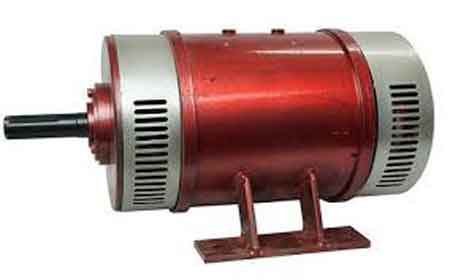
The rotor and stator are two of the essential components. The rotor is the rotating component, containing the magnets that produce the rotating magnetic field. The stator is the stationary component, having the electrical conductor that converts the rotating magnetic field into electrical output. The armature is the electrical conductor wound around the stator and produces the electrical output. It is usually made of copper or aluminum wire.
They can produce both AC and DC current. AC portable generators are the most common type used in most applications. They produce alternating current, meaning the current direction alternates periodically. In contrast, DC generators produce direct current, which flows in only one direction. They are used in specialized applications such as electric motors.
How Power is Generated and Regulated
The power output is determined by the magnetic field's strength and the rotor's speed. The stronger the magnetic field and the faster the rotor rotates, the higher the power output. The power output is usually measured in watts or kilowatts.
Fuel combustion is another crucial aspect of how generators work. Most are powered by internal combustion engines that burn gasoline, diesel, or natural gas. The engine drives the rotor, producing the rotating magnetic field that induces the electric current in the wire.
A voltage regulator is a component that controls the output voltage. It ensures that the voltage output remains constant even when the load on the device changes. This is important to prevent damage to electrical equipment connected to the unit.
The stator and rotor are the most crucial components, and they work together to generate electrical energy. The stator contains the electrical conductor that converts the rotating magnetic field into electrical output, and the rotor produces the magnetic field. The rotor rotates at high speed, generating a magnetic field that interacts with the stationary electrical conductor in the stator. The magnetic field induces an electric current in the wire, which generates an electrical output. Discover how an automatic transfer switch ensures seamless transitions between utility and electrical power.
Comparison of AC and DC Generator Technology
| Feature | AC Generator (Alternator) | DC Generator |
|---|---|---|
| Output Type | Alternating current (direction changes periodically) | Direct current (flows in one direction) |
| Common Use Cases | Homes, businesses, industrial applications, grid supply | Electric motors, battery charging, specialized equipment |
| Voltage Regulation | Typically uses automatic voltage regulators | Often uses commutators and brushes for output control |
| Efficiency | High efficiency at varying loads | Can be less efficient at high loads due to mechanical losses |
| Maintenance | Lower (no commutator brushes in most designs) | Higher (brushes and commutators wear over time) |
| Transmission | Suitable for long-distance power transmission | Less suitable for long-distance transmission |
| Cost | Generally lower for large-scale power generation | Generally higher for equivalent capacity |
| Durability | Longer service life with less mechanical wear | Shorter service life without regular maintenance |
Applications and Variations
Alternators are another type that is commonly used in vehicles. They are similar to AC generators but are designed to produce more power at lower speeds. Alternators are widely used in cars, trucks, and other vehicles to power the electrical system. Learn how different battery backup systems work to keep critical loads powered during outages. Learn how long battery backups last and what factors affect their reliability.
Generators are crucial devices that convert mechanical energy into electrical energy. They operate on the principle of electromagnetic induction and comprise several components, including the stator, rotor, armature, voltage regulator, and fuel combustion system. They can produce both AC and DC and are used in various applications. Understanding how generators work is essential for anyone who relies on electrical power. With this knowledge, you can appreciate the engineering behind these devices and make informed decisions about the best type for your needs. For a deeper look into reliable backup power solutions, check out our section on emergency backup generators.
Frequently Asked Questions
How does a generator work when the power goes out?
When utility power fails, a generator’s engine drives a rotor, creating a rotating magnetic field. This induces current in the stator windings, producing electricity. A voltage regulator maintains a stable output to protect connected equipment.
How does a generator work when it converts mechanical energy into electricity?
It uses electromagnetic induction, in which a rotating magnetic field induces current in the stator windings. Output depends on the rotor’s speed and the magnetic field’s strength.
What are the components of a generator?
Key parts include the rotor (which creates the magnetic field), the stator (which houses the conductors for output), the armature (wire windings), the voltage regulator, and the fuel system, which powers the engine that drives the rotor.
How does a generator maintain constant voltage?
A voltage regulator senses the output and adjusts rotor excitation to keep voltage steady, preventing damage to connected devices.
What is the difference between an AC and a DC generator?
AC generators produce alternating current with direction changes, common in most applications. DC generators produce one-way current for specialized uses like electric motors.
How does electromagnetic induction produce electrical energy?
When a conductor is in a changing magnetic field, current is induced. In generators, the rotor’s magnetic field interacts with the stator’s windings to create electricity.
How does a rotating magnetic field create electricity?
A rotor’s magnets spin, generating a magnetic field that passes through stationary stator windings. This induces current, with output based on magnetic strength and rotor speed.
Related Articles
Sign Up for Electricity Forum’s Generators/UPS Newsletter
Stay informed with our FREE Generators/UPS Newsletter — get the latest news, breakthrough technologies, and expert insights, delivered straight to your inbox.
Emergency Backup Generator
Emergency backup generator ensures standby power during outages, with automatic transfer switches, diesel or natural gas fuel, load management, and kW sizing to protect critical systems, homes, and businesses with reliable resilience.
What Is an Emergency Backup Generator?
An emergency backup generator is a standby power system that automatically restores electricity to critical loads.
✅ Automatic transfer switch engages within seconds
✅ Supports diesel, natural gas, or propane fuel
✅ Sized by kW, load priority, and runtime requirements
An emergency backup generator is a device that generates electrical power during an unexpected power outage or interruption in the power supply. Various factors, including natural disasters, severe weather conditions, or equipment malfunctions, can cause power outages. A unit can be a lifesaver in such situations, providing temporary power to essential appliances and keeping the lights on until power is restored. For an overview of emergency power supply concepts, see this introduction to emergency power supply for additional context.
Emergency backup generators come in different sizes and types and are typically powered by gasoline, diesel, natural gas, or liquid propane. Portable generators are typically smaller and can be moved around, while home standby generators are larger and permanently installed outside the home. Portable generators are an excellent choice for powering small appliances, while standby generators are more powerful and can supply power to an entire home.
When choosing a unit, it's important to consider the fuel source and the generator's power output. Generators run on different fuel types, and each type has advantages and disadvantages. Gasoline generators are commonly used due to their affordability and easy availability, but they require frequent refuelling and can be noisy. Diesel generators are more fuel-efficient and can provide longer run times but are typically more expensive. Natural gas and liquid propane generators are clean-burning and can provide uninterrupted power for extended periods, but they may require professional installation and can be expensive.
Generators work by converting mechanical energy into electrical energy. The fuel source powers the generator's engine, and the engine's motion is then converted into electricity by a generator alternator. The unit's power output is measured in watts, and the generator's wattage should be sufficient to power the essential appliances and devices during a power outage. However, it's important to note that a generator can power not all appliances and devices, and some may require a larger generator or an electrical panel upgrade.
An emergency generator should always be installed and operated according to the manufacturer's instructions to ensure safety and reliable performance. Portable generators should never be operated indoors, as they emit carbon monoxide and can cause deadly carbon monoxide poisoning. Extension cords should also be used to connect appliances to the unit, as improper use of extension cords can result in electrical shock or fire.
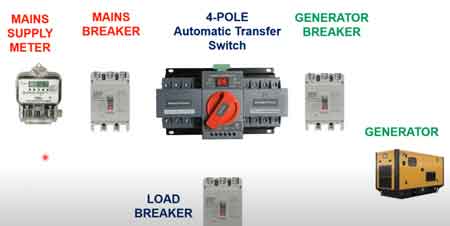
There are two types of home standby generator systems: manual transfer switches and automatic transfer switches. A manual transfer switch requires the homeowner to manually switch the electrical load from the utility power source to the unit. On the other hand, an automatic transfer switch automatically switches the load to the generator when the utility power goes out. An automatic transfer switch is a more convenient and reliable option. It ensures that the generator will start automatically and the essential appliances will be powered without manual intervention. For detailed specifications and selection guidance, review this automatic transfer switch resource to understand compatibility and code requirements.
Emergency backup generators are widely used in industrial, commercial, and institutional applications to provide reliable power during unexpected power outages. Here are some examples of how they are used in these settings:
Industrial Applications:
- Manufacturing plants: They are used to power critical manufacturing equipment during power outages, ensuring that production can continue without interruption.
- Oil and gas facilities: They power essential equipment such as pumps, compressors, and instrumentation during power outages, preventing downtime and maintaining safety.
- Data centers power critical IT infrastructure such as servers and networking equipment, ensuring that data and systems remain operational during power outages.
In many industrial environments, pairing generators with an uninterruptible power supply helps bridge transfer gaps and protect sensitive controls.
Commercial Applications:
- Retail stores: They power essential equipment such as cash registers, refrigerators, and lighting during power outages, ensuring that the store can remain open and customers can shop safely.
- Office buildings: They are used to power critical systems such as elevators, security systems, and lighting during power outages, ensuring that employees can continue to work safely.
- Hotels and resorts: They power essential equipment such as elevators, lighting, and HVAC systems during power outages, ensuring guests remain comfortable and safe.
For retail and office continuity, an UPS power supply can maintain point-of-sale terminals and network gear until generators assume the load.
Institutional Applications:
- Hospitals and healthcare facilities: They power critical medical equipment such as ventilators, monitors, and life support systems during power outages, ensuring patient care is not interrupted.
- Schools and universities: They power essential equipment such as lighting, HVAC systems, and emergency communications during power outages, ensuring that students and staff remain safe and comfortable.
- Government buildings: They power critical systems such as emergency lighting, communications, and HVAC systems during power outages, ensuring that government operations continue uninterrupted.
Institutions that depend on life safety and communications often deploy a UPS system to ensure clean power during transfer events.
They are essential for ensuring critical operations can continue during unexpected power outages in various industrial, commercial, and institutional settings.
How does a generator work?
During an unexpected power outage, a generator produces electrical power from a fuel source. When the power goes out, the unit's engine is powered by gasoline, diesel, natural gas, or liquid propane. The engine's motion is then converted into electricity by a generator alternator via an electric start, which produces electrical power. This power is transferred through a transfer switch to the home's electrical system, powering essential appliances and devices until power is restored. For a step-by-step explanation of this process, consult this guide on how a generator works before planning your installation.
How does a generator work with other technologies?
A generator can be used with other technologies to restore power after a power outage. For example, a solar panel system can generate electricity during the day. A unit can provide power at night or when the solar panels are not generating enough power. A battery backup system can also store excess solar or generator power, providing power during an outage. To size and configure storage correctly, compare options in this battery backup overview for best results.
What are the benefits of having an emergency backup generator?
There are several benefits. The most significant advantage is that it provides reliable power during a power outage, ensuring that essential appliances and devices continue functioning. This can be particularly important for households that rely on medical equipment or have special needs. Knowing that your home and family are protected during an unexpected power outage can also provide peace of mind. Finally, it can add value to your home, as it is a valuable and desirable feature for potential buyers.
What size generator do I need for emergency backup power?
The size of the generator needed for emergency backup power depends on the power requirements of the appliances and devices that need to be powered during a power outage. Therefore, it's important to calculate the wattage requirements of the essential appliances and devices during a power outage and choose a unit with a power output that is sufficient to power them. A licensed electrician or generator installer can help you determine the appropriate generator size based on your specific power requirements.
How long will it run?
The run time depends on several factors, including the fuel source, generator size, and load demand. Depending on the fuel source and generator size, portable power generators can run on a single fuel tank for several hours to several days. Therefore, choosing a unit with sufficient fuel capacity and monitoring its fuel level during a power outage is important. Then, if additional run time is needed, other dual fuel can be added to the unit.
Can I use one indoors?
Portable generators should never be used indoors, as they emit carbon monoxide and can cause deadly carbon monoxide poisoning. On the other hand, home standby generators are designed for outdoor installation and can be safely used during a power outage.
What maintenance is required?
Regular maintenance is important to ensure the reliable operation of a unit. This includes regular oil changes, air filter replacements, and spark plug replacements. It's also important to periodically test a unit to ensure it functions correctly and address any issues before a power outage occurs. A licensed electrician or generator installer can guide your unit's specific maintenance requirements.
Related Articles
Top 10 Tips For Selecting A UPS
Tips for Selecting UPS System: assess load capacity, runtime, topology (offline, line-interactive, online), power factor, battery chemistry, surge protection, voltage regulation, efficiency, redundancy, SNMP monitoring, and harmonics for reliable power conditioning.
What Are Tips for Selecting a UPS System?
Guidelines to choose a UPS by load, runtime, topology, efficiency, protection, and manageability.
✅ Size for total VA/W load with headroom; verify power factor.
✅ Calculate required runtime; consider battery chemistry and lifecycle.
✅ Choose topology; ensure surge protection, AVR, SNMP/Modbus monitoring.
Every day, an interruption to electrical service in homes, businesses and public sector organizations occurs, and the losses from these power outages can be extensive and of great consequence. For a business, the recovery time is significant and the costs are high. According to Price Waterhouse research, after a power outage disrupts information technology (IT) systems more than 33 per cent of companies take more than a day to recover and 10 per cent take more than a week. In addition, it can take up to 48 hours to reconfigure a network and days or weeks to re-enter lost data.
Power outages can cause substantial losses for the companies affected. According to the U.S. Department of Energy, when a power failure disrupts IT systems, 33 percent of companies lose $20,000 to $500,000, 20 percent lose $500,000 to $2 million and 15 percent lose more than $2 million. In fact, 90 per cent of companies that experience a computer disaster and don’t have a survival plan go out of business within 18 months. For risk mitigation, investing in an uninterruptible power supply can materially reduce downtime exposure.
In general, an uninterruptible power supply (UPS) protects IT equipment and other electrical loads from problems that plague our electrical supply. It prevents hardware damage typically caused by surges and spikes, prevents data loss and corruption, and provides availability for networks and other applications while preventing downtime. In some cases, a UPS provides enough battery runtime to ride through brief outages; in other cases, they provide hours of runtime to ride through extended power outages. For readers new to the topic, this overview of what a UPS system is provides helpful context for comparing options.
Here are the top tips to help you find and maintain a UPS system.
TIP #1
Understand Existing Power Infrastructure
This is a critical first stop in the qualification and sales process of choosing a UPS. While you may focus on larger, three-phase power systems, the majority of IT managers are dealing primarily with single-phase equipment, often at the rack level. Many existing computer room and small to mid-sized data centers have single-phase loads at the rack level. Ground-up designs are increasingly moving three-phase power to the point of utilization to gain efficiencies and reduce costs, creating great opportunity for three-phase solutions in new construction. If you are planning new builds or major retrofits, this guide to designing data center UPS infrastructure highlights architecture choices and common pitfalls.
TIP #2
Consider The Installation Environment
It’s imperative to understand how a prospective UPS will be deployed. Since most environments support several different solutions, you may need to evaluate these options. For environmental constraints and form factors, this primer on UPS power supply considerations outlines common deployment trade-offs.
TIP #3
Determine The Power Load
The VA or watt rating of your power loads is one of the most important factors in identifying the right UPS. After identifying the power environment (if the UPS needs to be single- or three-phase), the size of the UPS further narrows the selection. In single-phase deployments especially, it often makes sense to select a UPS that exceeds current power requirements but offers greater runtimes and allows for future growth.
TIP #4
Determine Availability Requirements
This is where you need to determine your true runtime requirements. During an outage, you need enough battery runtime to gracefully shut down systems or switch to backup generators. While runtime may seem like a simple thing to quantify, understanding the facts behind the numbers help contribute to the development of end-to-end solutions. Generally, the amount of runtime required can significantly affect the solution cost, but many Eaton solutions are actually more cost-effective in extended runtime applications. Improving conversion efficiency also extends battery autonomy, and many insights on high-efficiency UPS systems can inform runtime planning.
TIP #5
Determine Scalability Needs
It’s always important to consider your future expansion needs when evaluating UPS solutions. For cost-conscious or budgetconstrained customers, a UPS with inherent scalability often proves to be the best value in the long run, allowing you to increase capacity without purchasing additional hardware. A simple kVA upgrade is all that’s needed to enable a UPS with inherent scalability to operate at full capacity. You may want to service the UPS yourself. If that’s the case, look for a unit that allows you to add capacity with power and/or battery modules. While modular solutions—including multiple, paralleled systems—are often a more affordable option initially, they can be a more expensive solution over the long term due to added hardware and installation costs. Depending on your needs, a larger, centralized, non-modular system with inherent scalability might ultimately be the most cost-effective solution.
TIP #6
Consider Power Distribution
It is important for you to consider how power will be delivered to your critical equipment. In some cases, you may simply plug loads directly into the UPS. In others, you may need large PDUs to distribute power. You may also incorporate rack-based power strips or ePDU units into your design.
TIP #7
Research Manageability Software
While a UPS protects the attached load during a power outage, power management software is required to ensure that all work-in-progress is saved and that sensitive electronic equipment is gracefully shut down if the power outage exceeds the battery runtime of the UPS. Without software, the UPS simply runs until its batteries are depleted and then drops the load. Most power management software is shipped with the UPS and is usually available as a free download online as well. To align shutdown policies with hardware capabilities, a concise explainer on UPS uninterruptible power supply technologies can help you map software features to device topologies.
TIP #8
Consider Monitoring Capabilities
In addition to this basic functionality of UPS software, you should consider the implementation of monitoring and manageability capabilities. These capabilities include: power event notifications, including emails, pop-up alerts and text messages to pre-designated recipients; logging of power events; advanced capabilities in virtual environments, including integration into VMware’s ESXi and vSphere and Microsoft’s Hyper-V; dedicated battery monitoring and advanced service notifications; and remote monitoring by service personnel from the UPS manufacturer.
TIP #9
Access In-House Technical Capabilities
While you may value the ability to service your own equipment, the vast majority of IT and facility management professionals prefer the peace of mind that comes with full factory support through on-site service or an advanced UPS exchange agreement. To make an informed decision on service support, you must accurately assess your own technical and service capabilities. You should also look at the various UPS product designs to gauge how easy it is to swap out battery and power modules. Before committing to self-service models, review common UPS risks so your staffing plans account for maintenance, safety and lifecycle costs.
TIP #10
Prioritize To Maximize Budgets
Although the latest performance features of a UPS may fit nicely with what you are looking for, budget constraints may force you to make trade-off decisions. Be prepared to prioritize your needs for redundancy, scalability, efficiency, software management, modularity and serviceability.
From: Power Quality, Grounding & UPS Handbook, Vol 12, The Electricity Forum
Related Articles
Designing Data Center UPS Infrastructure
Designing Data Center UPS Infrastructure ensures resilient power continuity with N+1 redundancy, PDUs, ATS integration, battery sizing, harmonic mitigation, power quality monitoring, and scalable distribution aligned to Tier standards and critical load profiles.
What Is Designing Data Center UPS Infrastructure?
An electrical design method for reliable UPS power, N+1 redundancy, and monitoring in critical data centers.
✅ Specify UPS topology, runtime, and battery autonomy per load tiers.
✅ Design N+1/N+N redundancy with PDUs, ATS, and selective coordination.
✅ Model fault currents, harmonics, and grounding for power quality.
The data center has become a critical component in all types of organizations. It must be suitably planned and designed so as to allow sufficient guarantees of quality, efficiency and service continuity, regardless of the dimensions and the sector in which it operates.
Electrical power distribution systems are fundamental infrastructure for most production processes, and information technology (IT) infrastructures contribute to determining their performance, for example, in terms of safety, reliability and ease of maintenance. If system safety is a compulsory specification due to legal requirements, then reliability, availability and ease of maintenance are characteristics that nevertheless impact directly on the end user, but for which each business must establish its own policies. For critical racks, selecting the right UPS system involves capacity, runtime, and scalability considerations.
Finally, when designing a data center, it has to be considered that the IT industry, which owes its existence to electrical power, is heading toward a crisis period arising from huge costs, and will probably be one of the first sectors forced to adapt to new scenarios of low energy consumption. Indeed the issue of energy consumption in data centers will probably be one of the key issues in the management of IT infrastructures over the next few years. It is estimated that data centers, web factories and similar structures will dissipate almost five per cent of power generated globally into the environment. To curb operating costs, many facilities evaluate high-efficiency UPS systems alongside cooling optimizations and load management strategies.
Obviously, only some of a forementioned components are relevant to the design of the electrical power infrastructure.
In addition to considering typical personal safety aspects, the careful design of a data-center power distribution system is particularly important in relation to the high costs typically associated with downtime caused by power dips and interruptions. Redundant feeds paired with a UPS power supply can mitigate single points of failure without excessive complexity.
In addition to the constraint of low-power consumption mentioned above, which is dealt with in a specific white paper in this series and which will not therefore be discussed further in this document, probably the main aspects that must be take into consideration in the electrical design of a data center are power availability and maintaining power quality. In this context the choice of distribution scheme and static UPS systems plays a central role. At the rack or row level, deploying an uninterruptible power supply safeguards sensitive equipment during utility disturbances.
The following paragraphs deal with the basic concepts of availability, and discuss the main choices that the design engineer and customer are faced with when planning and designing the electrical distribution architecture of a data center. Early stakeholder alignment benefits from shared definitions of what a UPS system is and how it interfaces with generators and PDUs.
Obviously, only some of a forementioned components are relevant to the design of the electrical power infrastructure. In addition to considering typical personal safety aspects, the careful design of a data-center power distribution system is particularly important in relation to the high costs typically associated with downtime caused by power dips and interruptions. Risk assessments should also account for UPS risks such as battery degradation, firmware faults, and maintenance errors.
ELECTRICAL POWER AVAILABILITY
The main reliability parameter involved in the design of a data-center power distribution system is the availability of the power supply for a given user (for example a rack). In order to be able to make the right design and investment choices when planning the electrical power distribution system of a data center, it is necessary to consider the cost of interruptions in the service provided, taking into account that in the case in question even power dips result in long service interruptions. When planning service levels, clarify which loads require a UPS uninterruptible power supply versus those that can tolerate ride-through on gensets alone.
From: Power Quality, Grounding & UPS Handbook, Vol 12, The Electricity Forum
Related Articles
What is a UPS System?
A UPS system (Uninterruptible Power Supply) provides backup power during outages, protects equipment from voltage fluctuations, and ensures the continuous operation of critical systems in data centers, hospitals, and industrial facilities.
What is a UPS System?
It is a vital resource for businesses that need backup power to maintain operations during a power outage or other interruptions that could lead to significant financial losses.
✅ Provides immediate backup power to prevent system shutdowns
✅ Improves power quality with surge protection and voltage regulation
✅ Protects servers, networks, and critical loads with monitored battery runtime
Emergency Generators and Standby Power Training
Request a Free Training Quotation
It offers power protection, backup supply, conditioning, surge protection, management, and emergency power supply. In this article, we will explore the various types of UPS and explain in detail how a UPS works using the keywords you provided. For a broader overview of backup solutions and related technologies, visit our section on Electrical Generators and UPS Systems.
Types of UPS Systems
Three main types of UPS systems exist: online double conversion, line-interactive, and standby. Let's explore each of these types and their unique features and benefits. To understand how UPS units integrate with switching equipment, see our article on the role of an Automatic Transfer Switch in emergency power continuity.
Comparison of UPS System Types: Features, Performance, and Applications
| Feature | Online Double Conversion UPS | Line-Interactive UPS | Standby UPS |
|---|---|---|---|
| Power Protection Level | Highest | Moderate | Basic |
| Transfer Time | 0 ms (no delay) | 2–4 ms | Up to 10 ms |
| Power Conversion | AC ➝ DC ➝ AC (full double conversion) | AC with voltage regulation | Switches from utility to battery |
| Voltage Regulation | Continuous, precise | Automatic voltage regulator (AVR) | Minimal |
| Best For | Data centers, hospitals, mission-critical use | Small businesses, home offices | Personal computers, small electronics |
| Battery Usage | Always connected to load | Engages during outages | Engages only during outages |
| Cost | High | Medium | Low |
| Maintenance Requirement | High (complex systems) | Moderate | Low |
| System Size | Medium to large | Small to medium | Small |
| Noise and Heat Output | Higher | Moderate | Low |
Online Double Conversion UPS Systems
Online double conversion UPS is the most advanced and offers the highest protection level. They provide continuous power by converting the incoming AC power into DC power and back into AC power. This type of UPS is ideal for mission-critical applications requiring the highest protection level, such as data centers, hospitals, and other applications that cannot afford downtime. Online double conversion UPS uses a battery backup that is always connected to the equipment, providing uninterrupted power even during power fluctuations. In addition, the transfer time is typically zero, meaning it switches to battery power instantly when the input power fails.
Line-Interactive UPS Systems
Line-interactive UPS is suitable for small businesses and home offices. They provide basic power protection and battery backup and are easy to install and maintain. Line-interactive UPS uses an automatic voltage regulator to stabilize the voltage of the AC power supply, ensuring that equipment remains safe from damage. In addition, they have a short transfer time, typically between two to four milliseconds, which means they switch to battery power quickly when it fails.
Standby UPS Systems
Standby UPS is the most basic type of UPS suitable for personal computers and small electronic devices. They provide power protection and battery backup, but the transfer time can be up to 10 milliseconds, which means there may be a brief interruption in power when the unit switches to battery power.
How does a UPS work?
A UPS works by providing a backup power source to protected equipment during a power outage or any other interruption that may cause data loss or equipment damage. When the input power fails, the UPS switches to battery power instantly, providing uninterrupted power to sensitive equipment. In addition, the battery backup takes over the power supply during a power outage, ensuring no loss to sensitive equipment and continuing operations seamlessly until AC electricity is restored. Explore the benefits of High Efficiency UPS Systems that reduce energy waste while maintaining reliability.
Sensitive electronic equipment requires a clean and stable power source to function correctly. Power conditioning ensures that the voltage and frequency of the supply are stable, providing the necessary power source to keep equipment running without interruption. In addition, UPS provides surge protection, protecting equipment from surges and spikes, which can cause significant business losses. It can also protect equipment from lightning strikes that can cause significant damage.
The battery backup typically uses Valve Regulated Lead Acid (VRLA) batteries, which are maintenance-free and have a long lifespan. The lifespan depends on several factors, including the unit's quality and its maintenance. Emergency standby power supplies with regular maintenance can last anywhere from three to ten years. To maintain your unit, you should keep it in a clean, cool, and dry environment and perform regular maintenance, such as cleaning the battery terminals and checking the battery's charge level. It is also essential to replace the battery backup periodically, typically every two to three years, to ensure that your unit continues providing reliable backup power.
Common Power Problems
Power failures, power outages, and other common problems can cause significant business losses due to data loss and equipment damage. It is crucial for protecting sensitive equipment during these interruptions, ensuring smooth operations and reducing downtime. It offers protection, backup supply, conditioning, surge protection, management, and emergency power supply, reducing the risk of data loss and equipment damage. In addition, they are eco-friendly, help to reduce a company's carbon footprint, and extend the lifespan of sensitive electronic equipment, reducing the need for replacement. If you're wondering about battery lifespan, read our guide on How Long Do Battery Backups Last and what factors affect their performance.
How do I select the right kind?
When selecting a unit, businesses must consider their specific needs and budget. They come in various sizes, from small units that can provide backup power to a single computer to large units that can feed entire data centers. Businesses must also consider the runtime, which is the duration for which the system can provide backup power. The runtime depends on several factors, including the battery's size and the equipment's energy consumption. For help choosing the right solution for your facility, see our expert Tips for Selecting a UPS System.
Related Articles
Uninterruptible Power Supply
Uninterruptible power supply (UPS) delivers battery backup, surge protection, voltage regulation, and power conditioning to keep servers, networks, and critical equipment running during outages, with online and line-interactive inverter designs.
What Is an Uninterruptible Power Supply (UPS)?
An Uninterruptible power supply delivers battery backup, surge protection, and voltage regulation to prevent downtime.
✅ Protects servers and networking gear from power loss
✅ Provides AVR for brownouts, sags, and surges
✅ Offers online or line-interactive inverter topologies
An uninterruptible power supply is an essential component of modern life, providing emergency backup, electrical protection, and voltage regulation for a wide range of applications. From safeguarding sensitive equipment like single-phase networking devices and preventing data loss to ensuring the smooth operation of life-saving devices, UPS systems play a crucial role in maintaining the reliability of electrical supply. By understanding the different types of UPS systems, their features, and their applications, one can make an informed decision when selecting the right UPS system for their specific needs. For a concise primer, the basics of UPS systems explain core concepts for new buyers.
A UPS system offers several benefits beyond providing backup during an outage. One of its essential functions is power protection, ensuring that electrical equipment remains safe from surges, voltage fluctuations, and other electricity-related issues. Surge protection plays a critical role in this aspect by safeguarding connected devices from sudden voltage spikes, which could cause irreversible damage. These protective roles are described in the context of a UPS power supply and how it stabilizes connected loads.
Voltage regulation is another vital aspect of uninterruptible power supplies. It helps maintain a constant voltage level for the connected equipment, especially during voltage fluctuations. This feature is essential for the smooth operation of sensitive equipment like computers, networking equipment, and medical devices.
UPS systems come in various types, such as single-phase and three-phase, based on the electrical load they can handle. The most common types are line-interactive, double conversion, and standby. Line-interactive UPS systems adjust the input voltage with the help of an autotransformer, while double conversion systems convert the input AC power to DC and then back to AC, providing a pure sine wave output. Standby UPS systems, on the other hand, only switch to battery during an outage. A helpful overview of uninterruptible power supply architectures clarifies how these modes differ in practice.
The heart of any UPS system is its battery backup, which provides emergency supply when the main source fails. These batteries store electrical energy and release it during outages or fluctuations. The battery's run time is a crucial factor to consider when selecting a UPS, as it determines how long the connected devices can continue to operate on backup supply. For planning runtime, this battery backup guide outlines sizing and replacement intervals.
Another aspect to consider when selecting a UPS system is the volt-ampere (VA) rating, which indicates the maximum electrical load the UPS can handle. It is essential to choose a UPS with a VA rating that matches the electricity requirements of the equipment it will protect. A detailed checklist in the UPS selection guide helps match VA and wattage to your load.
Uninterruptible power supplies are indispensable for a wide range of applications, from residential use to large-scale industrial setups. For example, in homes, a UPS can provide backup supply to essential appliances and devices during an outage, ensuring safety and comfort. In businesses, UPS systems protect sensitive equipment like servers and networking devices from power-related damage, preventing data loss and ensuring business continuity.
In mission-critical facilities like hospitals, uninterruptible power supplies play a vital role in providing emergency supply to life-saving equipment and maintaining essential operations during failures. Similarly, UPS systems are critical in data centers, where they protect against data loss and downtime caused by disruptions.
Surge protectors are often used in conjunction with UPS systems to provide an additional layer of protection. While a UPS safeguards against outages and voltage fluctuations, surge protectors protect connected devices from voltage spikes caused by lightning strikes or other electrical disturbances. It is also important to understand potential hazards, and this review of UPS risks explains common pitfalls and mitigation steps.
To ensure optimal performance, it is essential to select the right UPS system for your specific needs. Factors to consider include the type of equipment you need to protect, the required run time, and the appropriate VA rating. Additionally, it is essential to keep in mind that some devices, like sensitive equipment and devices with motors, may require a UPS with a pure sine wave output.
Regular maintenance is crucial for the longevity and performance of a UPS system. This includes periodically checking and replacing batteries, as well as monitoring the overall health of the system. Proper maintenance ensures that your uninterruptible power supply remains ready to provide backup power and protection when needed.
What are the different types of UPS systems, and how do they differ in functionality?
There are three main types of UPS systems:
- Standby (offline) UPS: This type of UPS remains idle until a disruption occurs. When the main supply fails, it switches to battery to provide backup. Standby UPS systems are the most basic and cost-effective option, suitable for smaller applications like home computers.
- Line-interactive UPS: This type of UPS actively regulates voltage by using a built-in transformer that adjusts input voltage to maintain a consistent output voltage. When am electrical outage occurs, it switches to battery supply. Line-interactive UPS systems are suitable for small businesses and office environments, providing protection against voltage fluctuations and outages.
- Online (double-conversion) UPS: This type of UPS continuously converts incoming AC to DC and then back to AC, providing a pure sine wave output. It offers the highest level of electrical protection, isolating connected equipment from power disturbances. Online UPS systems are ideal for mission-critical applications, such as data centers and medical facilities, where consistent and clean power is essential.
How do I choose the right UPS system for my specific needs and equipment?
To choose the right UPS system, consider the following factors:
- Application: Determine whether you need a UPS for home, office, or industrial use, and choose the appropriate type (standby, line-interactive, or online) accordingly.
- Power requirements: Calculate the total electricity consumption of your equipment, and select a UPS with a sufficient capacity (measured in volt-amperes or watts) to handle the load.
- Runtime: Determine how long you need the UPS to provide backup electricity in the event of an outage, and choose a system with a suitable battery capacity.
- Voltage regulation and surge protection: Ensure the UPS provides the necessary level of voltage regulation and surge protection for your sensitive equipment.
What factors should I consider when determining the appropriate size and capacity of a UPS system?
Consider the following factors:
- Power consumption: Calculate the total electricity consumption of the connected equipment (in watts or volt-amperes).
- Runtime: Determine the desired runtime during an outage.
- Expansion: Consider any potential future equipment additions that may increase electricity requirements.
- Efficiency and redundancy: Account for UPS efficiency and, if needed, additional capacity for redundancy.
For organizations focused on lowering energy and cooling costs, a high efficiency UPS system can deliver meaningful savings without sacrificing protection.
How can a UPS system help protect my sensitive electronic equipment from electricity issues like power surges, outages, and voltage fluctuations?
A UPS system provides protection against electricity issues by:
- Supplying backup electricity during outages, preventing data loss and equipment shutdown.
- Regulating voltage to maintain a consistent output, protecting equipment from voltage fluctuations.
- Providing surge protection to shield connected devices from voltage spikes that can cause damage.
What is the importance of regular maintenance and battery replacement for UPS systems?
- Regular maintenance and battery power replacement are essential for:
- Ensuring optimal performance and efficiency of the UPS system.
- Prolonging the lifespan of the UPS and preventing premature failure.
- Maintaining consistent backup electricity availability during outages.
- Ensuring the safety and reliability of the UPS system and connected equipment.
How can a UPS system benefit various industries and applications, such as data centers, healthcare facilities, and residential use?
- Data centers: UPS protects against data loss and downtime, ensuring business continuity and safeguarding critical IT infrastructure.
- Healthcare facilities: UPS provides emergency electricity to life-saving equipment and essential systems, maintaining patient safety and care during electricity disruptions.
- Residential use: UPS protects home electronics from electricity disturbances and provide backup power during outages, ensuring safety, comfort, and the continued operation of essential devices.
Related Articles
UPS Uninterruptible Power Supply
UPS Uninterruptible Power Supply systems provide backup power, voltage regulation, and surge protection to protect data centers, servers, and sensitive electronics from blackouts, outages, and harmful power disturbances that threaten essential equipment.
What is a UPS Uninterruptible Power Supply?
A UPS Uninterruptible Power Supply is a device that ensures continuous electrical power during outages, providing protection, stability, and reliability for critical systems.
✅ Delivers emergency power during outages and blackouts
✅ Regulates voltage and protects against surges
✅ Safeguards computers, servers, and data center equipment
Emergency Generators and Standby Power Training
Request a Free Training Quotation
In today's technology-driven world, protecting sensitive electronic equipment from outages and power fluctuations is of utmost importance. An uninterruptible power supply (UPS) plays a crucial role in ensuring the safety and smooth operation of your devices. This article aims to provide an in-depth understanding of UPS systems, their types, and their benefits. To explore the broader role of backup systems, see our electrical generators and UPS overview, which explains how these technologies work together to ensure continuous power.
How a UPS Works
A UPS Uninterruptible Power Supply is a device that provides emergency backup to your electronic equipment in case of outages, voltage fluctuations, or other electrical-related issues. It acts as a buffer between your devices and the utility power, ensuring a continuous and stable power flow. The UPS system stores energy in its battery backup and switches to this reserve power source when the main power supply fails, preventing damage to sensitive equipment and loss of critical data.
Choosing the Right UPS
Choosing the right UPS depends on several factors, including the power requirements of your protected equipment, the desired runtime during an outage, and the level of quality needed.
To size a UPS properly:
-
Add up the wattage of all connected devices
-
Multiply the total by 1.2 to 1.3 for efficiency and growth
-
Use the result to determine the minimum UPS capacity in volt-amperes (VA)
It’s also important to calculate expected runtime, since different models are designed for short-term shutdown support versus extended operation.
Types of UPS Systems
Not all UPS systems are designed the same way, and choosing the right one depends on the level of protection your equipment requires. Entry-level models provide only basic surge protection and short-term battery backup, while advanced systems deliver continuous, high-quality power suitable for critical infrastructure like hospitals, data centers, and industrial operations. Understanding the differences between UPS types helps ensure you select the most effective solution for your application.
There are three main types of UPS systems:
-
Standby UPS – Provides basic surge protection and battery backup during utility failures.
-
Line-Interactive UPS – Adds automatic voltage regulation (AVR) to keep voltage within safe limits.
-
Double-Conversion UPS – Offers the highest level of power quality by continuously converting AC to DC and back to AC.
Advanced options also exist, including modular UPS designs, hybrid energy-saving modes, and diesel rotary UPS (DRUPS) systems for mission-critical environments. Reliable switching between utility and backup power requires an automatic transfer switch, a critical component in many UPS and generator setups.
UPS System Types Comparison
| UPS Type | Description | Advantages | Best Use Cases |
|---|---|---|---|
| Standby UPS | Basic surge protection and battery backup during utility failures. | Affordable, simple design, protects against short outages. | Home offices, small equipment, basic PCs. |
| Line-Interactive | Provides battery backup plus automatic voltage regulation (AVR). | Corrects under/over-voltages, more reliable than standby. | Small businesses, network equipment. |
| Double-Conversion | Continuously converts AC to DC and back to AC for clean, stable power. | Highest level of protection, eliminates electrical anomalies, zero transfer. | Data centers, hospitals, industrial use. |
| Advanced Options | Modular, hybrid, and DRUPS (diesel rotary UPS) designs for high reliability. | Scalable, energy-efficient, long runtimes, mission-critical performance. | Large enterprises, mission-critical systems. |
Features and Benefits
A UPS system protects electronic devices and data by offering surge protection, voltage regulation, and continuous emergency backup. In the event of a failure, the UPS provides power, enabling your devices to continue running and preventing data loss. Integrated surge protection shields against damaging voltage spikes. Some models also feature hot-swappable batteries, remote monitoring capabilities (SNMP), and power conditioning to filter out electrical noise and improve power quality.
The backup provided during an outage depends on battery capacity and device load. Small UPS units may provide a few minutes of support, while larger systems with extra battery modules can run for hours. For longer runtimes, higher-capacity UPS units or integration with standby generators are recommended. Learn how battery backup systems provide essential runtime support during outages and why proper sizing is key.
UPS Maintenance and Battery Care
Proper maintenance and timely replacement of UPS batteries are essential to ensure optimal performance and a longer lifespan for your unit. Proper maintenance is essential for optimal performance and a longer lifespan. Best practices include:
-
Keeping the UPS in a controlled environment (temperature and humidity)
-
Inspecting batteries for swelling, leaks, or corrosion
-
Running periodic self-tests and monitoring system logs
-
Replacing batteries every 3–5 years, depending on type and conditions
Valve-regulated lead-acid (VRLA) batteries are the most common choice due to low maintenance and long service life. Lithium-ion batteries are gaining popularity due to their higher energy density and longer lifespan.
Power Quality and Stability
UPS systems enhance power quality by correcting fluctuations, including under-voltage and over-voltage conditions. Line-interactive and double-conversion models maintain stable output even when utility power is unstable, protecting sensitive electronics from stress and failure. For enterprise-level reliability, our guide to designing data center UPS infrastructure highlights best practices in redundancy and scalability.
A Critical Investment
A UPS Uninterruptible Power Supply is an essential safeguard for electronic equipment and valuable data. By understanding the types of systems available, their features, and the importance of proper maintenance, you can select the right UPS to protect your operations, minimize downtime, and extend the life of your equipment. If you’re evaluating different technologies, see our page on high-efficiency UPS systems to compare performance, energy savings, and cost benefits.
Related Articles